
Happy Bob
Harald AI OyMedical
3.288.00 Reviews
- Version
- 1.15.2
- Installs
- 10.00K
- Age Rating
- Everyone
Screenshots
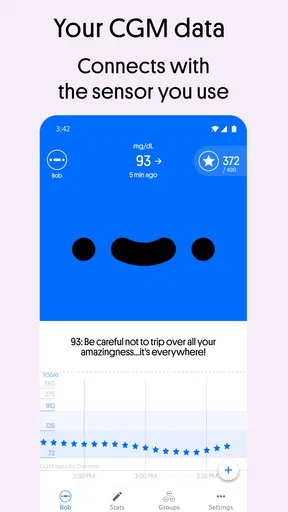
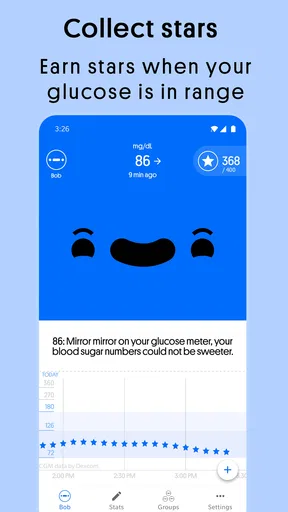
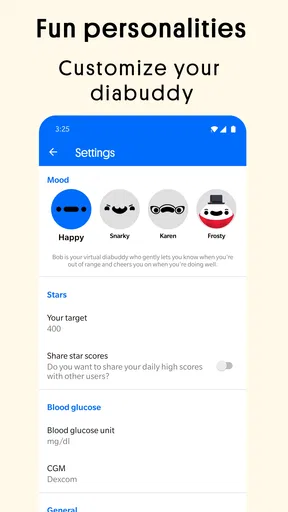
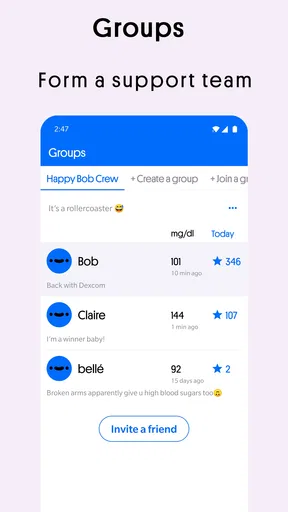
Our Review of Happy Bob
 Analysis by Appyee
I approached Happy Bob as a medical companion rather than another general wellness app. Its focus is diabetes management, and its central idea is to make the routine feel a little more rewarding. That sounds simple, but it matters: glucose care can become a long sequence of readings, reminders, decisions, and small corrections that are easy to treat as background noise. A tool that makes the process more engaging may help some people stay involved.
My overall impression is mixed but useful. The app is most interesting for people already using a compatible Dexcom setup who want a more encouraging way to look at their progress. It is less convincing as a standalone diabetes manager, and I would not choose it for someone who expects a complete replacement for their existing medical tools. The experience also depends heavily on connection and account setup, so the first few minutes deserve more attention than the cheerful presentation might suggest.
What Happy Bob is trying to do
Happy Bob is a free medical app from Harald AI Oy, with a store summary centered on rewarding diabetes management and its position as an authorized Dexcom Connected Partner. That tells me where its value lies: it is designed to sit alongside connected glucose information, not to replace clinical care or turn diabetes treatment into a game with independent medical authority.
The app is available to everyone by age rating, but that should not be confused with being suitable for every health situation without supervision. Diabetes decisions can be personal and medically significant. I see this app as a motivational layer around an established routine. I would still use the glucose information and treatment instructions provided by a healthcare professional as the foundation.
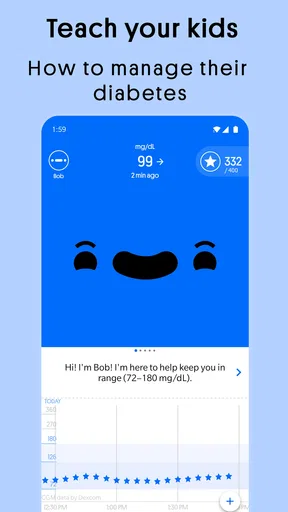
The store short description is simply “Happy Bob,” which leaves the actual experience to the app itself. In practice, the appeal is the emotional framing. Instead of presenting management as a dry list of tasks, it tries to give users a reason to return and notice their progress. That can be especially helpful for people who understand what they should do but struggle with consistency.
Where people are likely to get stuck first
The most common frustration with a connected health app is usually not the main screen. It is the handoff between services. Before blaming Happy Bob, I would check whether the Dexcom account is the one intended for connection, whether the relevant data source is active, and whether the phone itself is receiving current information. A motivational app cannot display a reliable stream if the source account is inactive or the underlying sensor data is delayed.
I would also avoid rushing through the first setup screens. Health apps often depend on permissions, sign-in choices, and consent steps that are easy to dismiss when you are eager to see the dashboard. If a permission is declined, the app may appear empty or incomplete even though the installation itself succeeded. Reading each prompt carefully is more useful than repeatedly reinstalling the app.
Another practical point is account consistency. If you use one email for your Dexcom service and another for the companion app, it becomes harder to tell whether the problem is a connection failure or simply the wrong account. I recommend writing down which login is being used before starting. That small habit prevents a surprisingly common loop of signing out, trying another account, and losing track of the original setup.
Because this is a medical app, I would not treat a missing update as an emergency signal. A blank or delayed display can come from connectivity, a paused source service, phone restrictions, or a temporary synchronization issue. If your usual glucose-monitoring method is still available, use it while investigating rather than making treatment decisions from an incomplete screen.
Setup checks that save time
My preferred setup order is straightforward. First, make sure the phone is running a supported operating system; the listed minimum is Android eight. Next, update the app if an update is offered, since the current version is 1.15.2. Then confirm the source app or account is working independently before asking Happy Bob to use it. This separates a source problem from a companion-app problem.
After installation, I would open the app on a stable connection and complete the sign-in process without switching between networks. If the first connection attempt fails, I would close the app normally, reopen it, and check the source account again. I would not repeatedly tap connection controls while changing passwords or moving between accounts, because that makes the eventual cause harder to identify.
Phone settings can also affect connected health experiences. Battery-saving features may limit background activity, while notification controls can make the app feel silent even when data is available. I would review those settings only if the app’s behavior suggests that updates or alerts are not arriving. There is no benefit in changing every phone permission preemptively; targeted checks are safer and easier to undo.
A useful test is to compare timing rather than expecting every screen to refresh instantly. If the source service shows recent information but Happy Bob does not, wait briefly, reopen the app, and check the connection path. If both are behind, the issue is probably upstream. This simple comparison is one of the most valuable troubleshooting habits because it avoids blaming the wrong component.
Using the app without turning management into a score chase
The rewarding approach can be motivating, but I would use it as encouragement rather than as a reason to force a perfect result. Diabetes is affected by meals, exercise, stress, illness, medication, sleep, and many other factors. A reward system can make patterns easier to notice, yet it cannot judge the whole context of a day. I would be careful not to read a disappointing result as a personal failure.
For someone who already checks glucose regularly, the strongest use case is behavioral: opening the app may make the routine feel less punishing and help keep attention on trends. It could also be useful for a person who loses interest in a purely clinical interface. The value is not that it replaces a medical record; the value is that it may make engagement easier to sustain between appointments.
A practical everyday scenario would be a busy weekday when I am moving between work, meals, and errands. Rather than opening several tools without a clear purpose, I could use my established glucose-monitoring method first, then look at Happy Bob as a quick motivational check. If the display seems out of date, I would verify the source before drawing conclusions. That workflow keeps the app in its proper role and avoids allowing a decorative layer to become the only place I look.
I also think it is important to separate motivation from treatment. If a reading seems unusual, I would follow the plan given by my healthcare team and the instructions for my glucose device. I would not change medication, skip food, or take corrective action merely because the companion app presents a reward, a setback, or an unexpected status.
Recovering when the workflow breaks
When the app stops behaving normally, I would troubleshoot in layers. First, check whether the source data is current. Second, confirm the account and connection. Third, close and reopen the app. Fourth, review phone connectivity and battery restrictions. Only after those checks would I consider reinstalling. Reinstallation can clear local problems, but it can also add another sign-in step, so it should not be the first reflex.
If the app shows older information while the source is current, note the approximate time of the mismatch and what changed beforehand. For example, did the phone restart, switch networks, or receive a system update? A short record is more useful when contacting support than saying only that the app “does not work.” It also helps reveal whether the issue is repeatable.
If you cannot connect at all, I would avoid creating multiple new accounts. That may produce duplicate profiles or make it unclear where the original data belongs. Instead, return to the first account used and work through the sign-in process carefully. If a password or account detail is the obstacle, resolve that at the account level before testing the companion app again.
There is also a difference between a display problem and a data problem. If the source device or service provides current readings through its normal route, Happy Bob may be the part that needs attention. If the source itself is not current, the companion app cannot repair that underlying gap. This distinction sounds obvious, but it prevents a lot of wasted effort and keeps health decisions tied to the most dependable available source.
When Happy Bob is not the cause
Connected health workflows involve several moving parts: the sensor or monitoring device, its source service, the phone, the network, the user account, and the companion app. A failure in any one of them can look like an app failure. That is why I would test the source independently and check whether other connected services are also delayed before deciding that Happy Bob is responsible.
Phone changes are another clue. If the problem begins after switching devices, restoring a backup, changing battery settings, or updating the operating system, the new phone environment deserves attention. The same is true after changing account credentials. These events can interrupt a connection without meaning that the app itself has become unusable.
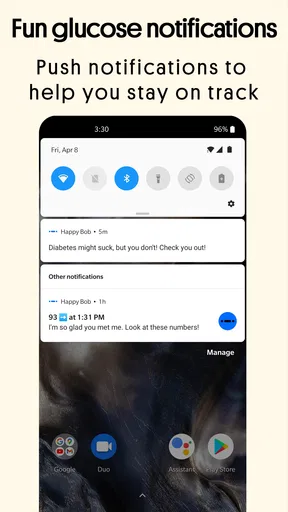
I would also distinguish missing notifications from missing data. A quiet phone does not necessarily mean that the underlying information is unavailable. Check the app directly and compare it with the source service. If the information is present but notifications are absent, review notification controls; if the information is absent in both places, investigate the source connection instead.
For safety, I would never use a troubleshooting session as a substitute for medical advice. If you feel unwell or your glucose information is concerning, follow your personal care plan and contact an appropriate healthcare professional. Happy Bob can support attention and routine, but it is not the right place to make urgent clinical judgments.
How it compares with ordinary alternatives
Compared with a traditional glucose-monitoring app, Happy Bob’s differentiator is its emotional and rewarding presentation. A conventional tool may be better when I need detailed records, device settings, or a clinical view designed for sharing with a care team. Happy Bob makes more sense when the problem is not a lack of information but a lack of motivation to keep looking at it.
Compared with a general habit tracker, it is more relevant to a Dexcom-connected diabetes workflow, but it is not interchangeable with a complete health journal. A habit tracker might handle medication, meals, exercise, sleep, and appointments in one flexible place. Happy Bob’s appeal is narrower: it can make diabetes management feel more approachable, while a broader organizer may offer more control over the surrounding routine.
That trade-off helps define the audience. I would recommend trying it to someone who already has a compatible Dexcom-based routine and wants a friendlier companion. I would be less enthusiastic for a person seeking a universal diabetes diary, a replacement for professional monitoring, or a single app that organizes every health detail.
Cost, support, and everyday expectations
The app itself is free to download, which makes trying the basic experience relatively low-risk. It also includes in-app purchases priced from $5.99 to $69.99 per item. I would look carefully at any purchase screen before confirming, especially if I only want to test whether the connection and motivational style suit me. The free entry point is helpful, but the presence of optional purchases means the full experience should not be assumed to be entirely cost-free.
Its audience appears established but still fairly modest: the app has passed ten thousand installs. The average rating is 3.2 from 262 ratings, with 88 written reviews. I read that as a reason to keep expectations realistic rather than as an automatic rejection. A connected medical app can be highly useful to one person and frustrating to another depending on device, account, phone settings, and personal preference.
The app was released on September 15, 2020, and the current version is 1.15.2. Those details matter mainly when deciding whether to update before troubleshooting. I would use the current version available for the phone, then repeat the connection checks instead of judging the app from an old installation.
Who should try it, and who should skip it
I think Happy Bob is worth trying if you already use a compatible Dexcom connection, appreciate encouragement more than dense charts, and want a small nudge toward staying engaged. It may be particularly appealing when standard medical interfaces feel cold or repetitive. The app’s best contribution is psychological: making a necessary routine feel less like a chore.
I would skip it if you need a complete clinical record, rely on a different monitoring ecosystem, or dislike reward-based interfaces. I would also avoid depending on it as the only view of glucose information. If your priority is detailed reporting for appointments, a dedicated diabetes-management platform may be the better primary tool, with Happy Bob used only if its motivational layer genuinely helps.
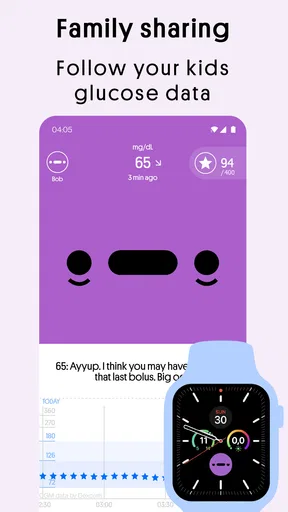
Families and caregivers should be equally careful about assumptions. The age rating is Everyone, but diabetes management still requires appropriate adult and clinical guidance. A simple interface may be approachable, yet simplicity does not remove the need to understand the underlying device, account, and care plan.
My practical verdict
Happy Bob is a focused companion for people who want diabetes management to feel more rewarding, especially within a Dexcom-connected routine. I like the attempt to address the emotional side of consistency, and I can see why a friend might prefer it to a strictly clinical screen. The main weakness is that its usefulness depends on a smooth connection chain, while setup and synchronization problems can be difficult to diagnose at first.
My advice is to install it with realistic expectations: confirm the source service first, use the same account throughout setup, check phone restrictions only when needed, and keep your established monitoring and treatment plan in charge. If the connection works and the encouraging approach makes you return more consistently, the app can earn a place in your routine. If you need comprehensive records or a universal diabetes toolkit, choose a more clinically oriented alternative instead.
The best reason to use Happy Bob is not to chase a perfect score; it is to make reliable attention to diabetes care easier to maintain. That is a modest goal, but for the right user, it is a worthwhile one.
Verdict
Strengths of Happy Bob
- Simple interface makes the app easy to navigate.
- Offers quick access to entertainment and daily activities.
- Lightweight design should work well on many devices.
- Useful features are presented in a clear, organized layout.
- Suitable for casual users who want a straightforward experience.
Limitations of Happy Bob
- Some features may require an account or personal information.
- The app may feel limited for users seeking advanced options.
- Performance can vary depending on device and internet connection.
- Notifications may become distracting if not configured carefully.
- Availability of certain content or features may differ by region.
Similar Picks in This Category
View All
WebMD: Symptom Checker
WebMD, LLC4.1

Microphone Amplifier
DOSA Apps4.2

Anatomy Learning - 3D Anatomy
3D Medical OU4.5

Period Tracker and Calendar
SimpleInnovation4.9

GoodRx: Prescription Coupons
GoodRx4.8

CVS Health
CVS Pharmacy4.5
Frequently Asked Questions
What is Happy Bob, and what can I do with the app?
Happy Bob is a mobile wellness and happiness app designed to help you reflect on your mood, build positive habits, and engage with simple activities that may support your emotional well-being. After opening the app, users can typically explore mood-related prompts, self-care exercises, reminders, and progress features. It is intended for everyday personal use rather than as a replacement for professional mental-health care.
Is Happy Bob free to download and use?
Happy Bob may be available to download at no initial cost, but some features, content, or customization options can depend on the app’s current subscription model. Before confirming a purchase, check the store listing and the in-app subscription screen carefully for pricing, billing frequency, trial conditions, and renewal details. Availability and included features may also vary between Android and iOS.
Does Happy Bob require an account or an internet connection?
The exact requirements can vary by version, but Happy Bob may ask you to create or sign in to an account so it can save your preferences, mood entries, goals, or progress across sessions. Some parts of the app may work offline after installation, while syncing, updates, account features, advertisements, or online content can require an internet connection. Review the permissions and privacy information before registering.
Is Happy Bob suitable for children or people experiencing serious mental-health problems?
Happy Bob can be useful as a light self-care and reflection tool, but its suitability depends on the user’s age, maturity, and the content available in the current version. It should not be treated as a diagnostic, therapy, or emergency service. Anyone experiencing severe distress, self-harm thoughts, or a mental-health crisis should contact a qualified professional or local emergency service instead of relying only on the app.
How does Happy Bob handle my personal and mood-related information?
Because an app focused on happiness or mood tracking may collect sensitive information, it is important to read Happy Bob’s privacy policy before entering personal details. Check what data is collected, why it is used, whether it is shared with third parties, how long it is retained, and whether you can delete your account or entries. Also review device permissions and disable any access that is not necessary for the features you want.
